Quick Start
This guide helps you make your first API call within a few minutes. Follow the steps below to set up authentication and start exploring our APIs.
All examples in this guide are shown using cURL. For more integration options, refer to the API documentation.
Prerequisites
Before you start, make sure you have the following:
- A properly running inverter connected to Solinteg Cloud (online)
- A Solinteg Open API account and password: note that Solinteg Open API and Solinteg Cloud Monitoring System are two independent systems. Your Solinteg Cloud Monitoring System account cannot be used to access the Solinteg Open API.
- Self-registration is not available yet; the service is only provided to organization users. To apply, contact your sales representative, and we will reply within 1-2 business days.
- Please Provide your organization name, create account email, and purpose description in the application.
- Basic knowledge of RESTful APIs and the MQTT protocol
- Familiarity with basic inverter business concepts, and the ability to understand the meaning of property parameters, configuration parameters, and telemetry data
Environments
| Environment | URL | Purpose |
|---|---|---|
| Production | https://lb.solinteg-cloud.com/openapi/v2 | Production use |
The documentation site has a built-in API online debugging (Playground) feature:
- Open any API in the API list
- Select the target environment in the Servers dropdown
- Fill in the parameters and click Send Request
- The response is displayed directly below
When sending requests in the Playground, you can first call the login API to obtain a token, and then fill it into the token authentication field of other APIs (you only need to fill it in once, until the token expires).
Your First API Call
1. Log in to Get a Token
This is a prerequisite for calling all subsequent business APIs (except login).
The token has a validity period (60 minutes). After it expires, you need to call the login API again to obtain a new one.
curl -L 'https://lb.solinteg-cloud.com/openapi/v2/loginv2/auth' \
-H 'Content-Type: application/json' \
-H 'Accept: application/json' \
--data-raw '{
  "authAccount": "user@example.com",
  "authPassword": "123456"
}'
Extract the token from the returned body.
{
  "errorCode": 0,
  "info": null,
  "successful": true,
  "body": "eyJhbGciOiJIUzI1NiJ9.eyJpYXQiOjE3Nz..."
}
2. Bind a Device
Binding a device requires the SN and CheckCode, which you can obtain in either of the following two ways:
- From the device nameplate.
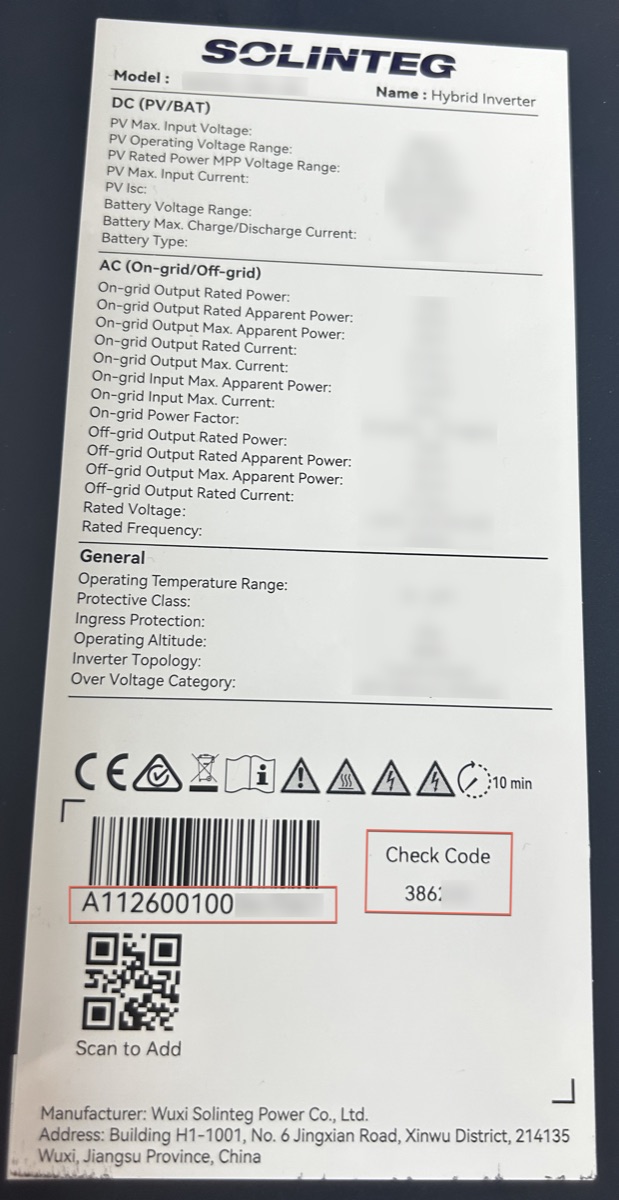
- If you are also using the Solinteg Cloud monitoring system, you can obtain them from the
Device Realtime Infopage.
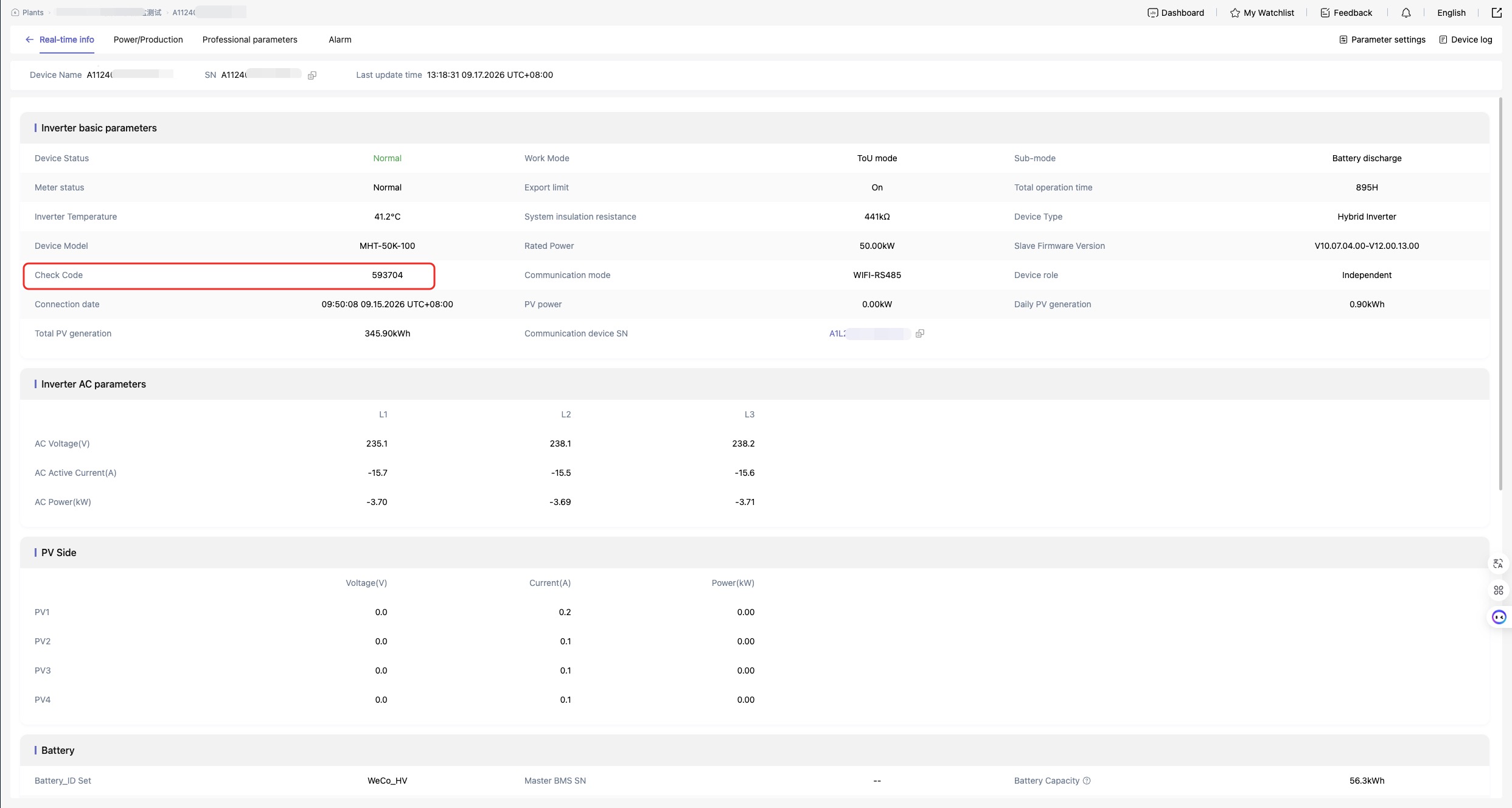
Example:
curl -L 'http://8.209.107.231:7710/openapi/v2/wrapper/topic/addTopicMapping?deviceSn=A11230010013204A&topic=%2FAKi0SPuVjN&checkCode=059442' \
-H 'Accept: application/json' \
-H 'token: eyJhbGciOiJIUzI1NiJ9.eyJpYXQiOjE3Nz...'
Binding successful
{
  "errorCode": 0,
  "info": null,
  "body": true,
  "successful": true
}
3. Verify and Query All Devices Under Your Account
curl -L 'http://8.209.107.231:7710/openapi/v2/wrapper/topic/getDeviceByTopic?topic=%2FAKi0SPuVjN' \
-H 'Accept: application/json' \
-H 'token: eyJhbGciOiJIUzI1NiJ9.eyJpYXQiOjE3Nz...'
The response shows all the devices you have bound:
{
  "errorCode": 0,
  "info": null,
  "body": [
    {
      "deviceSn": "A11250010094305B",
      "modelType": "M2HT-125K-300"
    }
  ],
  "successful": true
}
4. Query the Current Configuration Parameters of a Device
curl -L 'http://8.209.107.231:7710/openapi/v2/wrapper/device/queryDeviceConfigData?deviceSn=A11220010013007C' \
-H 'Accept: application/json' \
-H 'token: eyJhbGciOiJIUzI1NiJ9.eyJpYXQiOjE3Nz...'
Returns all configuration and property parameters of this device. These parameters determine how the inverter operates and are usually stable.
{
  "errorCode": 0,
  "info": null,
  "body": {
    "deviceType": "STORAGE_INVERTER",
    "firmwareVersion": "V1-0820-0108",
    "checkCode": "426956",
    "communicationMode": "WIFI-/",
    "safetyCountry": 10,
    "inverterReconnectionTime": 31,
    "antiCounterCurrentStartStop": 1,
    "antiReverseCurrentPowerSetting": -1.6,
    "ctRatioSetting": 1200,
    "activePowerLimitE2": 60,
    "pfSettings": 1,
    "firstUnderVoltageValue": 184,
    "firstUnderVoltageTime": 80,
    "firstOverVoltageValue": 276,
    "firstOverVoltageTime": 80,
    "batteryTypeCode": "16#0",
    "peakLoadShiftSwitch": 1,
    "gridMaximumCapacitySet": 60,
    "gridConnectedSocProtection": 1,
    "gridConnectedDischargeDepth": 15,
    "hybridWorkMode": "1#1",
    "masterSlaveFlag": 0,
    "systemControl": 0,
    "offGridOverload": 30,
    "offGridVoltageSet": 230,
    "masterSn": "FFFFFFFFFFFFFFFF",
    "softwareVersion": "5398",
    "hardwareVersion": "8240",
    "rtcTime": "2026-05-20 20:10:37",
    "batCapacity": 61.4,
    "dataLoggerSN": "A1L26001020000A1",
    "dataLoggerTime": "2026-05-20 12:10:39 +0000"
    ...
  },
  "successful": true
}
5. Query the Current Telemetry Data of a Device
This API returns the most recent telemetry packet, which represents the current working status of the inverter.
curl -L 'http://8.209.107.231:7710/openapi/v2/wrapper/device/queryDeviceRealtimeData?deviceSn=A11250010294305B' \
-H 'Accept: application/json' \
-H 'token: eyJhbGciOiJIUzI1NiJ9.eyJpYXQiOjE3Nz...'
{
  "errorCode": 0,
  "info": null,
  "successful": true,
  "body": {
    "invSn": "A11250010094305B",
    "alarms": [],
    "modelType": "M2HT-125K-300",
    "temperature1": 58.6,
    "temperature2": 55,
    "temperature3": 53.7,
    "temperature4": 47,
    "vpv1": 646.7,
    "vpv2": 636.9,
    "vpv3": 624.1,
    "vpv4": 658.3,
    "vpv5": 649.6,
    "vpv6": 700.8,
    "vpv7": 6553.5,
    "vpv8": 6553.5,
    "vpv9": 6553.5,
    "vpv10": 6553.5,
    ...
  }
}
FAQ
Authentication Failed
When you receive authentication-related errors, check:
- Whether the
tokenfield is included in the request headers (note that it is a customtokenheader, notAuthorization) - Whether the token has expired; if so, log in again to obtain a new one
- Whether you are using the environment address that matches your account
404 Not Found
If the API address is incorrect, confirm:
- The Base URL matches the selected environment
- The API path is spelled correctly
- Path parameters (such as
{deviceSn}) are replaced correctly
Rate Limiting (QPS)
Each API has a certain QPS limit. Please refer to the API documentation.
{
  "errorCode": 1,
  "info": {
    "code": "429001",
    "description": "Account-level total rate limit exceeded."
  },
  "body": null,
  "successful": false
}
Please implement retry and backoff strategies in your integration to avoid high-frequency calls.
Next Steps
- Read the EMS control documentation (ToU mode / EMS mode) to understand the use cases of the two control modes
- Browse the API list to learn about device management, data query, device control, and other API capabilities
- If you need help, contact us through your sales representative or developer support channels